

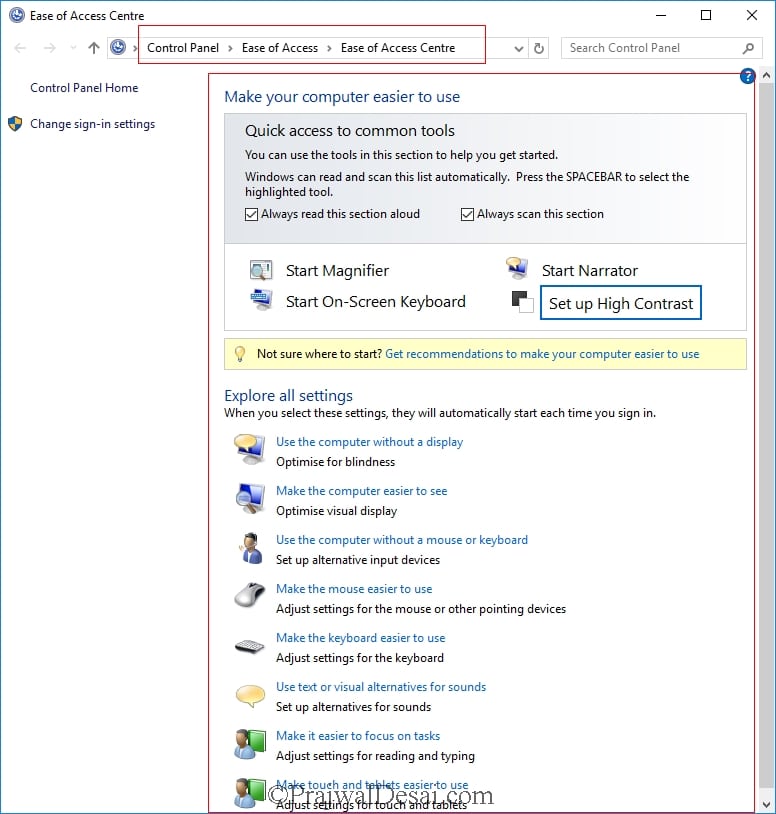
This post lists the Windows 10 ease of access keyboard shortcuts. Windows operating systems comes with a unique component named Ease of Access Center. Ease of access center provides the users great set of features. Some of the features includes Narrator, Magnifier, On-screen Keyboard and High Contrast settings. Most of all common options are also available from the sign-in screen. I am sure most of you have seen the options on the sign-in screen in lower-right corner. With Windows 10 operating system, Ease of Access options are available in Settings. To quickly launch Ease of Access Center, on your keyboard press [su_label type=”info”]Windows [/su_label]+[su_label type=”info”]U[/su_label]. Also it can be accessed from control panel as well. If you aren’t sure from where to start, Windows 10 offers “Get recommendations to make your computer easier to use”. Based on your answers to set of questions, you get better recommendations for settings.
Ease of access center settings include :-
[su_list icon=”icon: gear” icon_color=”#1BA1E2″]
- Use the computer without a display
- Make the computer easier to see
- Use the computer without mouse or keyboard
- Make the mouse easier to use
- Make the keyboard easier to use
- Use text or visual alternatives for sounds
- Make it easier to focus on tasks
- Make touch and tablets easier to use
[/su_list]
[su_quote]There are no limits to what people can achieve when technology reflects the diversity of everyone who uses it.[/su_quote]
 Windows 10 Ease of Access keyboard shortcuts
Here is the table that lists windows 10 ease of access keyboard shortcuts. Press the keys in order to activate the setting.
| Keys Info | Result |
| Hold Right Shift key for 8 seconds | Turns filter keys on/off |
| Press Left Alt+Left Shift+PrtScn | Turns High contrast on/off |
| Left Alt+Left Shift+Num Lock | Turns Mouse Keys on/off |
| Press Shift key five times | Turns Sticky Keys on/off |
| Hold Num Lock for 5 seconds | Turns Toggle Keys on/off |
| Press Windows logo key+U | Opens Ease of Access Center |
