In this post, I will list out some basic queries that can retrieve installed software from Add or remove programs from a remotely managed SCCM device using SQL query. Using these queries, administrators can generate accurate reports on installed software across managed systems, provided that inventory is properly enabled and up to date.
By default, SQL Server cannot directly read the data from add or remove programs, but with Configuration Manager, this data is inventoried and added to the SQL database. SCCM typically gets the software information from hardware inventory (Namespace: root\cimv2 and class Win32Reg_AddRemovePrograms64 and Win32Reg_AddRemovePrograms). For more information, refer the documentation for resource explorer classes.
So if you’re querying the SCCM SQL database, you should query the inventory views, not the local machine registry directly from SQL Server. These queries are very helpful if you have a remote Windows server and want to quickly determine which programs are installed on the device.
Query installed software via Add or remove Programs
I will now provide the queries that can retrieve data for 32-bit programs, 64-bit programs, and installed software programs from a specific Windows device. I’ve manually tested each query, and they function perfectly without any issues.
To execute any of the below queries, launch the SQL Server Management Studio (SSMS) and connect to the database engine. Expand Databases, and right-click Configuration Manager database, and select New Query. In the query window, paste and execute the query.
SQL Query for 32-bit Programs
The below SQL query lists all the installed 32-bit programs via add or remove programs on Windows device. The below query uses v_GS_ADD_REMOVE_PROGRAMS to list information about the 32-bit software installed on Configuration Manager client computers.
SELECT
    SYS.Name0 AS ComputerName,
    ARP.DisplayName0 AS SoftwareName,
    ARP.Version0 AS Version,
    ARP.Publisher0 AS Publisher,
    ARP.InstallDate0 AS InstallDate
FROM v_R_System SYS
INNER JOIN v_GS_ADD_REMOVE_PROGRAMS ARP
    ON SYS.ResourceID = ARP.ResourceID
ORDER BY SYS.Name0, ARP.DisplayName0;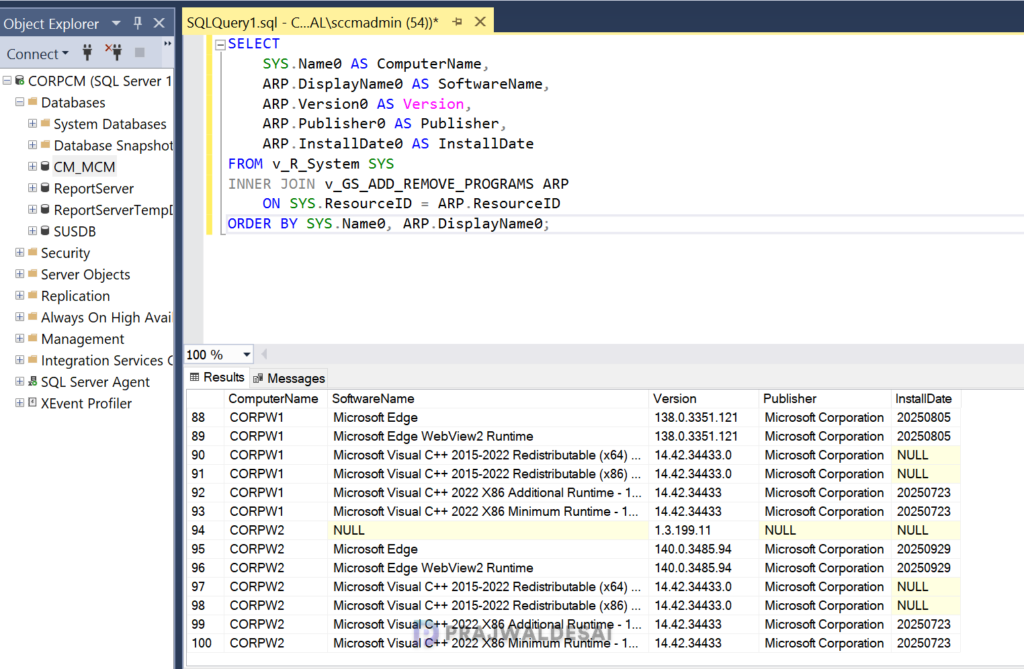
SQL Query for 64-bit Programs
Use the below SQL query to list all 64-bit programs installed on a Windows device via add or remove programs. The below query uses v_GS_ADD_REMOVE_PROGRAMS_64 to list information about the 64-bit software installed on Configuration Manager client computers.
SELECT
    SYS.Name0 AS ComputerName,
    ARP.DisplayName0 AS SoftwareName,
    ARP.Version0 AS Version,
    ARP.Publisher0 AS Publisher,
    ARP.InstallDate0 AS InstallDate
FROM v_R_System SYS
INNER JOIN v_GS_ADD_REMOVE_PROGRAMS_64 ARP
    ON SYS.ResourceID = ARP.ResourceID
ORDER BY SYS.Name0, ARP.DisplayName0;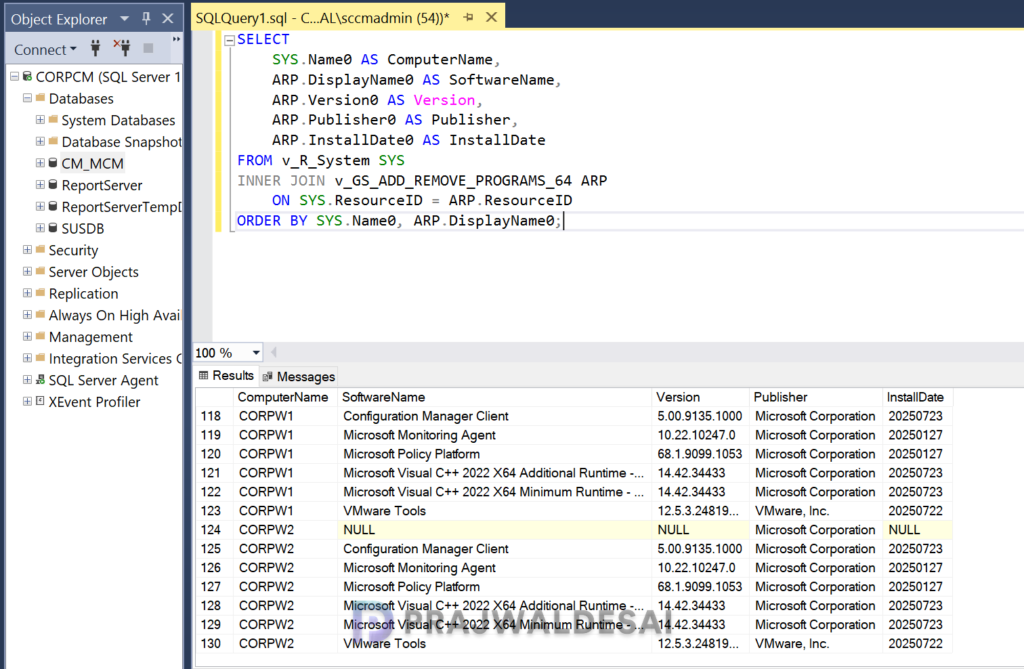
SQL Query for 32-bit and 64-bit installed programs
Here is a single query to list both 32-bit and 64-bit software programs installed on Windows computers. As you can see, it uses both v_GS_ADD_REMOVE_PROGRAMS and v_GS_ADD_REMOVE_PROGRAMS_64 to retrieve the data.
SELECT
    SYS.Name0 AS ComputerName,
    ARP.DisplayName0 AS SoftwareName,
    ARP.Version0 AS Version,
    ARP.Publisher0 AS Publisher,
    ARP.InstallDate0 AS InstallDate,
    '32-bit' AS Source
FROM v_R_System SYS
INNER JOIN v_GS_ADD_REMOVE_PROGRAMS ARP
    ON SYS.ResourceID = ARP.ResourceID

UNION ALL

SELECT
    SYS.Name0 AS ComputerName,
    ARP64.DisplayName0 AS SoftwareName,
    ARP64.Version0 AS Version,
    ARP64.Publisher0 AS Publisher,
    ARP64.InstallDate0 AS InstallDate,
    '64-bit' AS Source
FROM v_R_System SYS
INNER JOIN v_GS_ADD_REMOVE_PROGRAMS_64 ARP64
    ON SYS.ResourceID = ARP64.ResourceID

ORDER BY ComputerName, SoftwareName;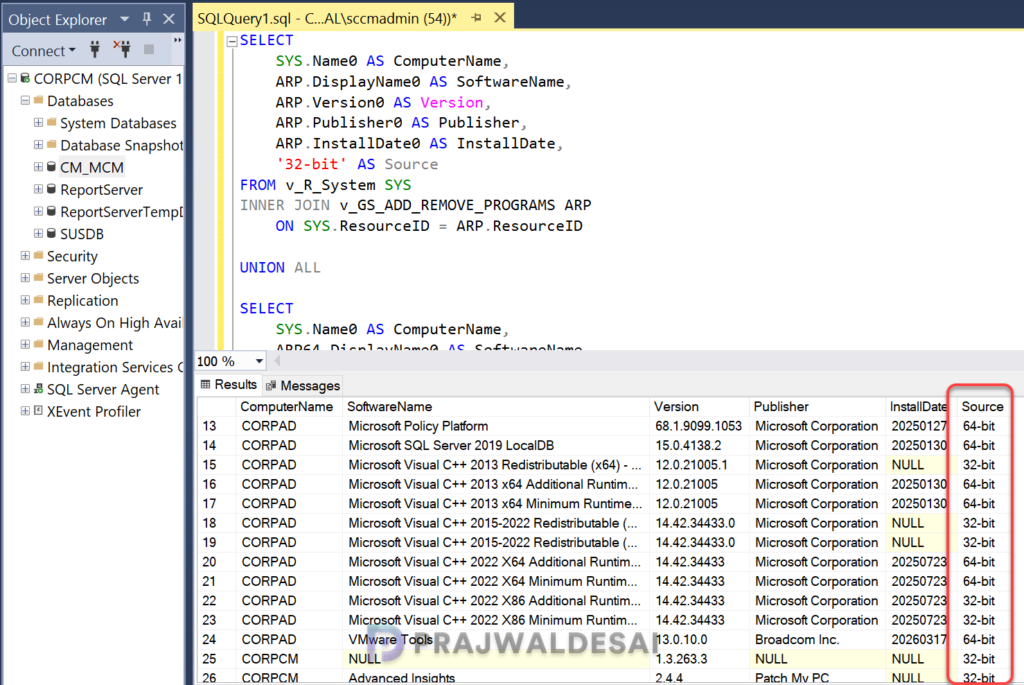
Query for a specific software title
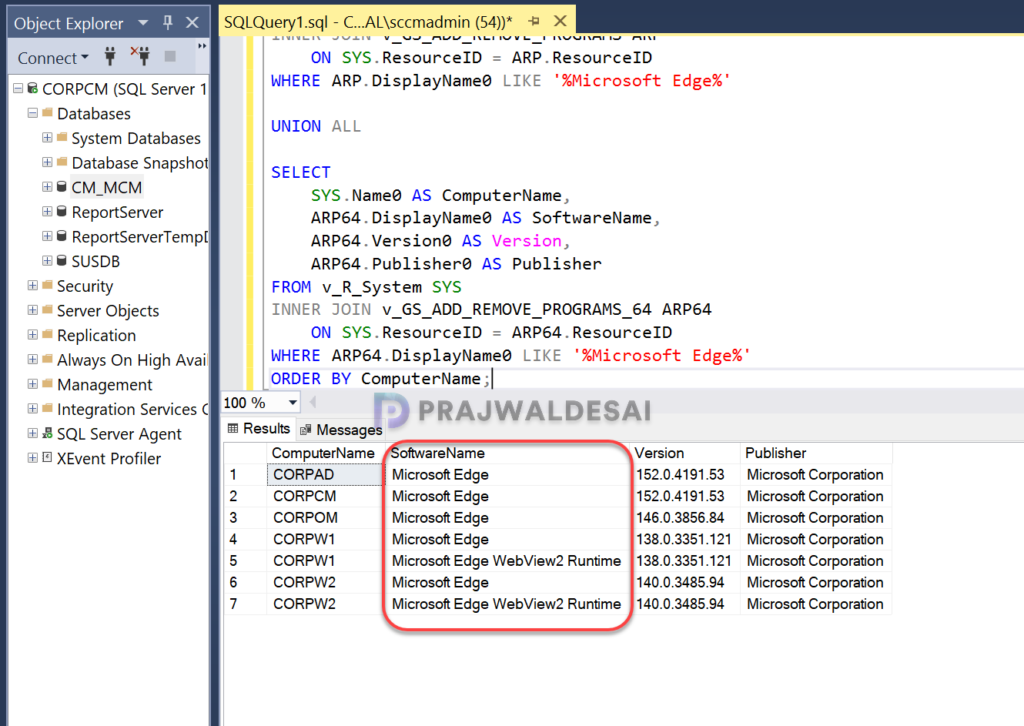
If you’re looking to query a software using its title or name, use the below SQL query. The below query looks for Microsoft Edge installed on the devices and lists its versions along with additional information. If you’re running this query, just replace the application name with the one that you want to query.
SELECT
    SYS.Name0 AS ComputerName,
    ARP.DisplayName0 AS SoftwareName,
    ARP.Version0 AS Version,
    ARP.Publisher0 AS Publisher
FROM v_R_System SYS
INNER JOIN v_GS_ADD_REMOVE_PROGRAMS ARP
    ON SYS.ResourceID = ARP.ResourceID
WHERE ARP.DisplayName0 LIKE '%Microsoft Edge%'

UNION ALL

SELECT
    SYS.Name0 AS ComputerName,
    ARP64.DisplayName0 AS SoftwareName,
    ARP64.Version0 AS Version,
    ARP64.Publisher0 AS Publisher
FROM v_R_System SYS
INNER JOIN v_GS_ADD_REMOVE_PROGRAMS_64 ARP64
    ON SYS.ResourceID = ARP64.ResourceID
WHERE ARP64.DisplayName0 LIKE '%Microsoft Edge%'
ORDER BY ComputerName;
Query a single device for installed programs
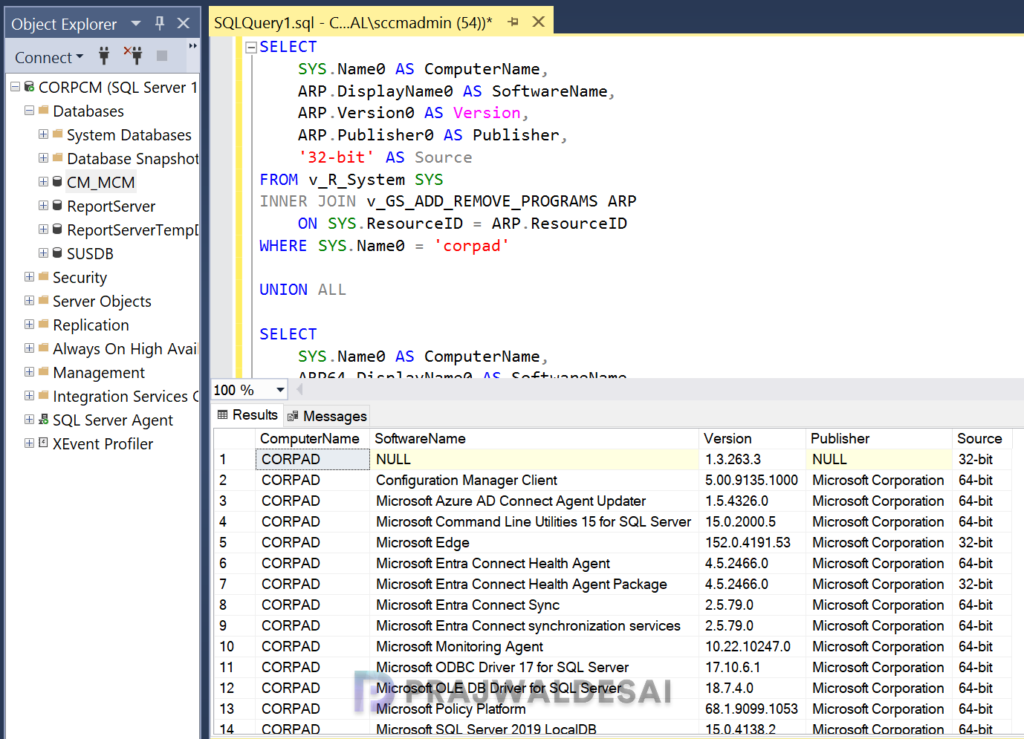
If you are looking to inventory a single device to find the installed programs, then use the below SQL query. You will need to replace the value of SYS.Name0 with the computer name in the query before using it.
SELECT
    SYS.Name0 AS ComputerName,
    ARP.DisplayName0 AS SoftwareName,
    ARP.Version0 AS Version,
    ARP.Publisher0 AS Publisher,
    '32-bit' AS Source
FROM v_R_System SYS
INNER JOIN v_GS_ADD_REMOVE_PROGRAMS ARP
    ON SYS.ResourceID = ARP.ResourceID
WHERE SYS.Name0 = 'corpad'

UNION ALL

SELECT
    SYS.Name0 AS ComputerName,
    ARP64.DisplayName0 AS SoftwareName,
    ARP64.Version0 AS Version,
    ARP64.Publisher0 AS Publisher,
    '64-bit' AS Source
FROM v_R_System SYS
INNER JOIN v_GS_ADD_REMOVE_PROGRAMS_64 ARP64
    ON SYS.ResourceID = ARP64.ResourceID
WHERE SYS.Name0 = 'corpad'
ORDER BY SoftwareName;