


KB5079473 is the cumulative update for Windows 11, versions 25H2 and 24H2, released in March 2026. This update includes improvements to File Explorer search reliability, handling of COM object allowlisting policies in WDAC, and increased coverage of devices eligible to automatically receive new Secure Boot certificates.
The KB5079473 security update applies to OS Builds 26200.8037 and 26100.8037 and contains fixes and quality improvements from KB5077181 (released February 10, 2026). For more information, refer to a complete list of updates released for all versions of Windows 11.
KB5079473 Improvements
The KB5079473 security update, released in March 2026, includes the following enhancements.
- Secure Boot: This update enhances Windows quality updates by incorporating additional high-confidence device targeting data, broadening the range of devices eligible for automatic delivery of new Secure Boot certificates. Devices will only receive these certificates after exhibiting consistent successful update performance, ensuring a controlled and gradual rollout process.
- Improved File Explorer Search: This update improves File Explorer search reliability when searching across multiple drives or “This PC“.
- Windows Defender Application Control Improvements: This update enhances the handling of COM object allowlisting policies in WDAC. Previously, COM objects were blocked when the endpoint security policy exceeded the allowlisting policy. With this improvement, COM objects are now permitted as intended.
- Updates to Windows System Image Manager: This update enhances the reliability of selecting trusted catalog files by introducing a warning dialog. This dialog ensures you can verify that the chosen file originates from a trusted source.
Updates to AI Components
The March 2026 security update for Windows 11 includes the updates for the following AI components.
| AI Component | Version |
|---|---|
| Image Search | 1.2602.1451.0 |
| Content Extraction | 1.2602.1451.0 |
| Semantic Analysis | 1.2602.1451.0 |
| Settings Model | 1.2602.1451.0 |
Download KB5079473 from Microsoft Update Catalog
The KB5079473 update downloads and installs automatically from Windows Update and Microsoft Update. However, if you wish to get the standalone package(s) for this update, go to the Microsoft Update Catalog website and download it.
If you’ve already installed previous updates, your device will download and install only the new updates included in this package. This includes the updates to AI components as well.

Installing Windows 11 March 2026 Update
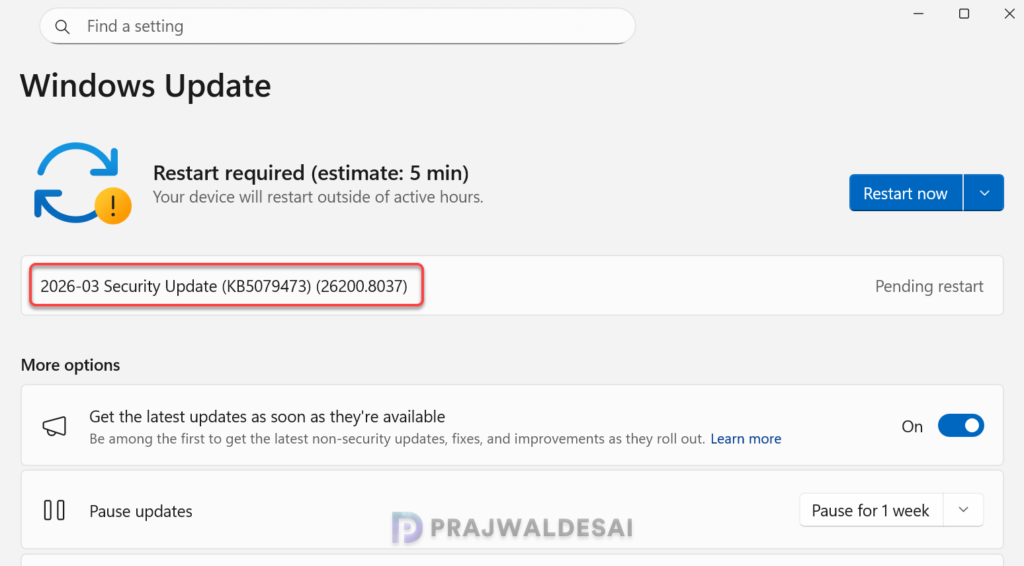
The 2026-03 Security Update downloads and installs automatically from Windows Update. If you don’t see the update listed, open the “Windows Update” settings, turn on the “Get the latest updates as soon as they’re available” option, and click the “Check for Updates” button.
The KB5079473 security update will require a system reboot upon installation. Click on the Restart now button to reboot your computer. After the system is back, your Windows 11 build should be updated to 26200.8037.
KB5079473 Known Issues and Reported Bugs
Many Windows users hesitate to install the latest security updates, fearing they might cause system issues or disruptions. If you’re deploying the March 2026 security update via SCCM or Microsoft Intune for business devices, it is important to understand the known issues and bugs reported for an update.
Users on Reddit, Microsoft Learn, and other websites have reported issues after installing the update.
- The March 2026 update KB5079473 for Windows 11 has reports of installation failures (error 0x80070306), access to C:drive is denied, app crashes (e.g. Outlook, Calculator, Snipping Tool), and system freezes, particularly on Samsung Galaxy Book devices. Reported on Microsoft Learn.
- Activation Issues: Some users report that their Windows status changes to “Not activated” with error 0xC004F211. Users noticed that troubleshooting the activation displayed the message “We weren’t able to activate Windows on this device“. Reported on Microsoft Learn.
Update: Microsoft has released an emergency update KB5085516 to address a major issue that breaks sign-ins with Microsoft accounts across multiple Microsoft apps, including Teams and OneDrive.
Uninstall KB5079473 Update
If you haven’t installed the March 2026 security update yet, you may pause updates in Settings. If you’ve already installed the update, and you are encountering some of the known issues, go to Settings > Windows Update > Update history > Uninstall updates. Alternatively, you may also use PowerShell to list the updates and uninstall them.
