

In Configuration Manager, optimizing content distribution is essential for improving software deployment speed and reducing network usage. One effective way to do this is to enable clients to download delta content when available in SCCM. I believe this feature helps devices receive only the changed parts of content instead of downloading entire files again.
Modern applications need to deliver updates quickly and efficiently. In enterprise environments, sending full content for every update can waste time and bandwidth. An efficient way to improve performance in your Configuration Manager setup is to enable clients to download delta content when available.
By default, the option to allow the clients to download delta content is not turned on, and you have to do that via ConfigMgr client settings. When this option is set to Yes, delta download is used for all Windows update installation files, not just express installation files.
What is Delta Content in SCCM?
Delta content in System Center Configuration Manager (SCCM) allows clients to download only updated portions of deployment content. When small changes are made to applications, packages, or updates, SCCM can send just the differences rather than the full content set. This approach is especially useful for organizations managing large environments where bandwidth efficiency matters. More information about this setting can be found in Microsoft documentation.
Benefits of Enabling Delta Content
When you enable delta content in SCCM, you can gain several advantages:
- Reduced network bandwidth usage for large organizations.
- Faster content downloads for clients.
- Improved deployment efficiency.
- Lower strain on distribution points.
- Better support for remote offices and slower connections.
Allow Clients to Download Delta Content When Available
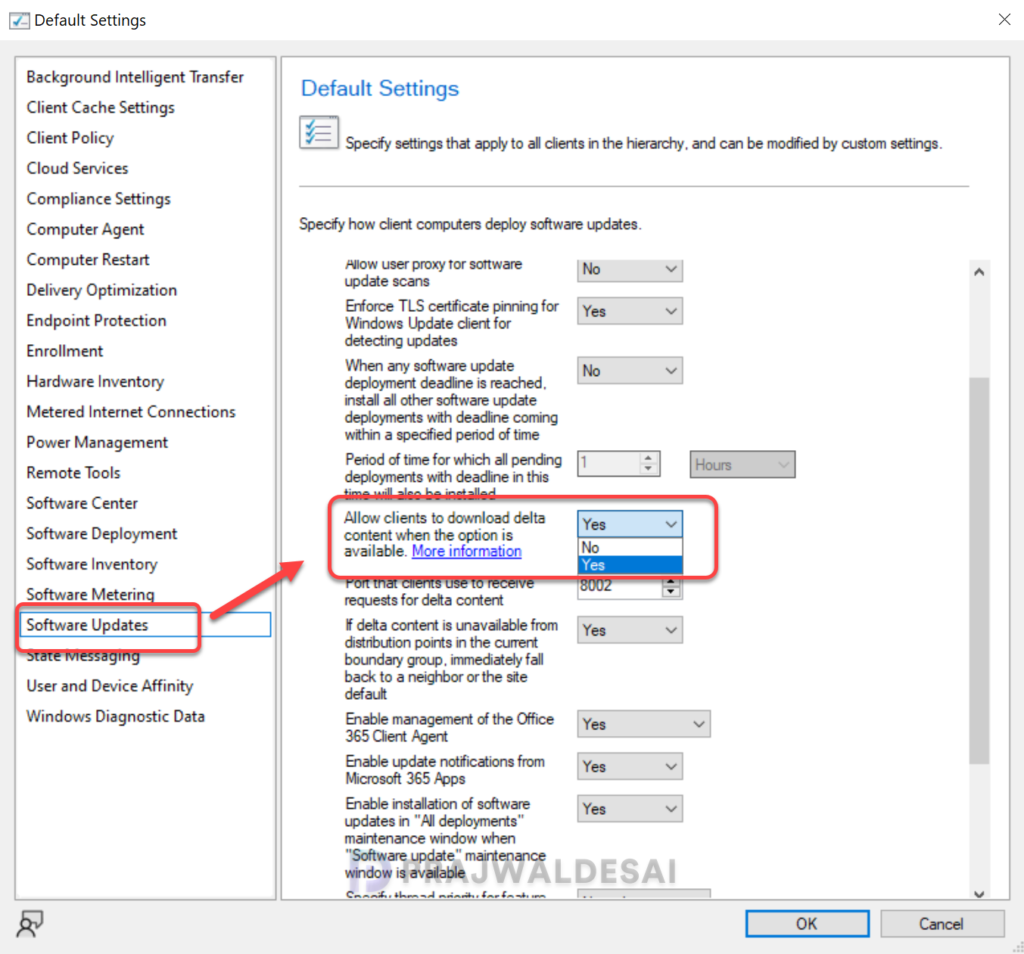
Launch the Configuration Manager console and navigate to Administration\Overview\Client Settings. Select the client setting and go to its properties. Select the Software Updates tab and scroll down to find the setting “Allow Clients to Download Delta Content When Available” and set it to Yes. Click OK to save the changes.
Note: When using a CMG for content storage, the content for third-party updates won’t download to clients if the Download delta content when available client setting is enabled.
If your organization uses SCCM for application and update deployment, it is worth exploring options to enable clients to download delta content when available. This small configuration can deliver meaningful improvements in speed, bandwidth savings, and overall client experience.
