

In this guide, I’ll explain why you encounter the warning message Site version is past the end of support in the SCCM console and provide steps to resolve it permanently. I will also share some recommended actions that can help you to get rid of this warning.
Every Microsoft product including Configuration Manager current branch versions has a pre-defined support lifecycle policy. These policies define the timelines for security updates, non-security updates, and technical support.
When you see a new current branch version released, it basically comes with defined support start and end dates. Once the support period ends, you don’t get the updates for that version, and you are required to upgrade to the next available version. Delaying the upgrades for an extended period triggers a console warning, notifying administrators that the site has exceeded its support period.
Resolve Site version is past the end of support warning
The warning message “Site version is past the end of support” in Configuration Manager console indicates that your current version is over 18 months old, no longer receives security updates. To resolve this, you must upgrade to a newer Current Branch version through the Updates and Servicing node in the console.
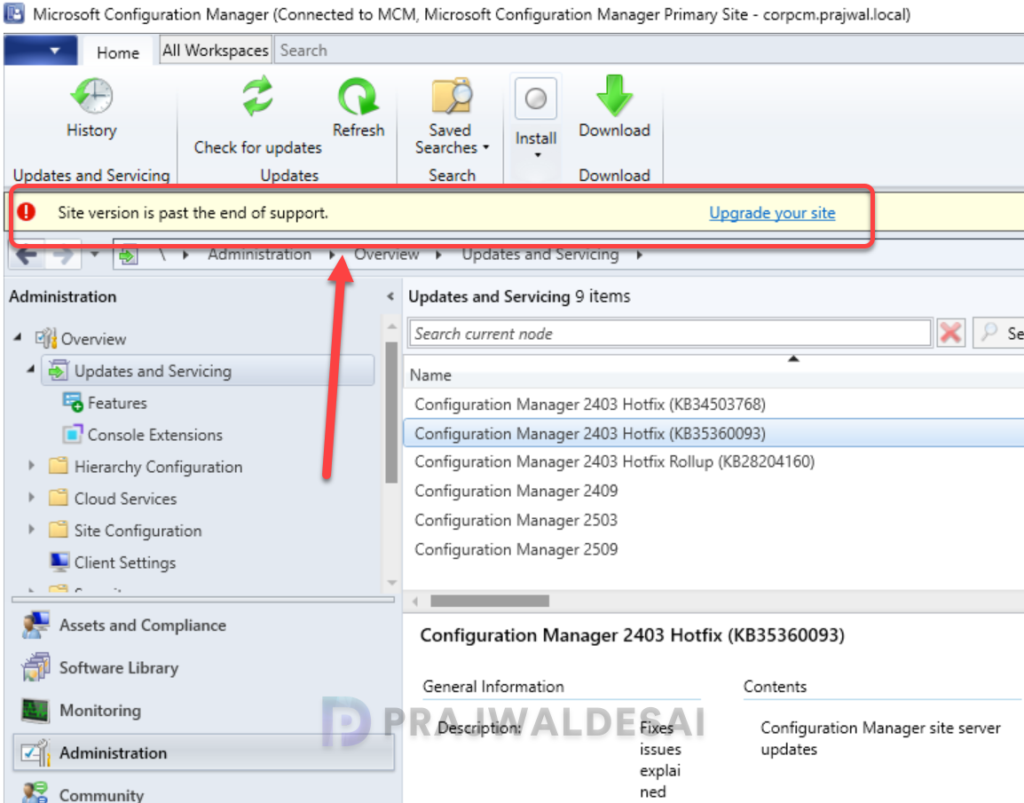
The support lifecycle warning mentioned above appears each time you open the console, but it doesn’t necessarily mean your site is malfunctioning. It simply indicates that Microsoft recommends upgrading your SCCM site to a supported version.
In some cases, ConfigMgr admins postpone upgrades due to change control or compatibility concerns. I have also seen this warning commonly occurring in the environment that is disconnected or has sync issues.
If you’re using a supported Configuration Manager version but still encounter the console warning, it may be due to a delayed console notification. This can typically be resolved by either updating the console or waiting for the telemetry check to refresh.
Important logs to review
When dealing with console warnings, you can review the following logs on the site server:
- CMUpdate.log: Check update download/install progress
- hman.log: Monitor hierarchy manager activity
- ConfigMgrPrereq.log: Prerequisite check results
- dmpdownloader.log: update package download status
For a list of other logs and their exact location on server/client, refer to the complete list of SCCM log files.
Recommended Actions
- Check the current SCCM version: Verify your current version in the console under Administration > Site Configuration > Sites.
- Check Software Assurance expiration date: Open the console, go to Administration > Site Configuration > Sites. Click on “Hierarchy Settings” on the ribbon at the top. Under the Licensing tab, verify if you have defined a proper Software Assurance expiration date.
- Upgrade to supported version: Plan an upgrade to the latest supported ConfigMgr current branch version as soon as possible. If the latest updates don’t appear in the console, re-check the Service connection point configuration. Alternatively, you use baseline media to install a new version of Configuration Manager.
Performing the above actions should resolve the console warning site version is past the end of support. If you have any further questions or need support, please let me know in the comments below.
