

On July 14, 2026, Microsoft released cumulative updates KB5101650 for Windows 11 versions 25H2 and 24H2 and KB5099414 for version 23H2. These updates focus on performance improvements and new features like point-in-time restore, enhanced widgets, accessibility improvements, file explorer enhancements, and Bluetooth reliability.
The features introduced in this update were already part of the KB5095093 preview update that came out in the last week of June 2026. The July 2026 Patch Tuesday security update includes new features and quality improvements that were part of the following update:
- June 9, 2026 – KB5094126 (OS Builds 26200.8655 and 26100.8655)
- June 23, 2026 – KB5095093 (OS Builds 26200.8736 and 26100.8736) Preview
Along with the improvements, Microsoft also mentioned in their KB update documentation that KB5101650 addresses security vulnerabilities documented in the July 2026 Security Updates guide. Furthermore, the following AI components are updated to version 1.2605.856.0: Image Search, Content Extraction, Semantic Analysis, and Settings Model.
New Features and Improvements in July 2026 Cumulative Updates
Following are the new features and fixes that are included in the cumulative update for Windows 11, version 25H2 and 24H2 (KB5101650):
- Point-in-time Restore for Windows: The new restore feature enables quick PC rollback (apps, settings, files) to recent points, reducing downtime and simplifying troubleshooting.
- Windows Update: The new calendar in Settings > Windows Update allows pausing updates up to 35 days with customizable end dates.
- Widgets: Improved experience with no hover interruptions, default dashboard view, customizable settings, reduced distractions, and enhanced performance.
- Accessibility: Screen tint for eye strain, enhanced magnifier with zoom precision, and setting changes directly from the magnifier bar.
- File Explorer: Quick actions (Open file location, Ask Copilot) on hover; speed and performance improvements; fixes for OneDrive, path compatibility, rename issues, and address bar reliability.
- Bluetooth: Improved connection reliability, faster AirPods pairing, voice call stability, enhanced LE Audio performance, synced mute state, and error resolution.
- Bluetooth and Phone Link: Improved audio routing for calls and integration with Do Not Disturb mode.
- Voice Access: Voice access and typing are supported in French, German, Spanish with real-time corrections for smoother dictation.
- Audio: Improved HD Audio driver reliability.
- Taskbar: Enhanced Start menu opening reliability for left-aligned taskbar icons.
- Networking: SR-IOV default for CVMs, improved Wi-Fi, cellular connectivity, and VPN compatibility; settings preserved during OS upgrades.
- Printing: Default to IPP for new printer installs; modernized printer driver selection; toggle in Settings added.
- WSL: Enhanced WSL usage with mirrored networking for VPNs.
- Display/Graphics: Improved rendering across multiple monitors and persistent color profile application.
- Location Services: Greyed-out location settings when services are off for clarity.
- Search: Improved search group policy reliability.
- Input: New customizable right-click zones in touchpad settings; improved English character recognition in Japanese handwriting.
- Performance: Faster shutdown of Background Intelligent Transfer Service (BITS) during PC shutdown.
- Reliability: Explorer.exe reliability and navigation improved; fixes for taskbar icons, OneDrive sync, app launches, desktop switching, and visuals.
- Windows Apps: Fix for unexpected elevation (UAC) prompts after installing KB5089549.
- Remote Desktop: Refreshed dialog design in Settings > System > Remote Desktop.
- Graphics Kernel: Better memory management for large local AI models on high-memory PCs.
Manually download July 2026 updates from MS Update Catalog
Both the KB5101650 & KB5099414 updates for Windows 11 can be manually downloaded from the Microsoft Update Catalog site and installed. To get the standalone package(s) for these updates, use the direct links.
- Download KB5101650 from the Microsoft Update Catalog.
- Download KB5099414 from the Microsoft Update Catalog.
Download all MSU files for KB5101650/KB5099414 from the Microsoft Update Catalog and place them in a folder (for example, C:/Packages). To apply the above update on a Windows PC, run the following command from an elevated PowerShell window:
Add-WindowsPackage -Online -PackagePath "c:\packages\windows11.0-kb5101650-x64_5d4163c2e483adc9456b7ea9a8ea83d8fceaf52c.msu"Installing KB5101650 KB5099414 Update on Windows 11
Both KB5089549 and KB5099414 updates are offered through Windows Update for devices running versions 25H2, 24H2, and 23H2. If you don’t see the update listed, open the “Windows Update” settings and click the “Check for Updates” button.
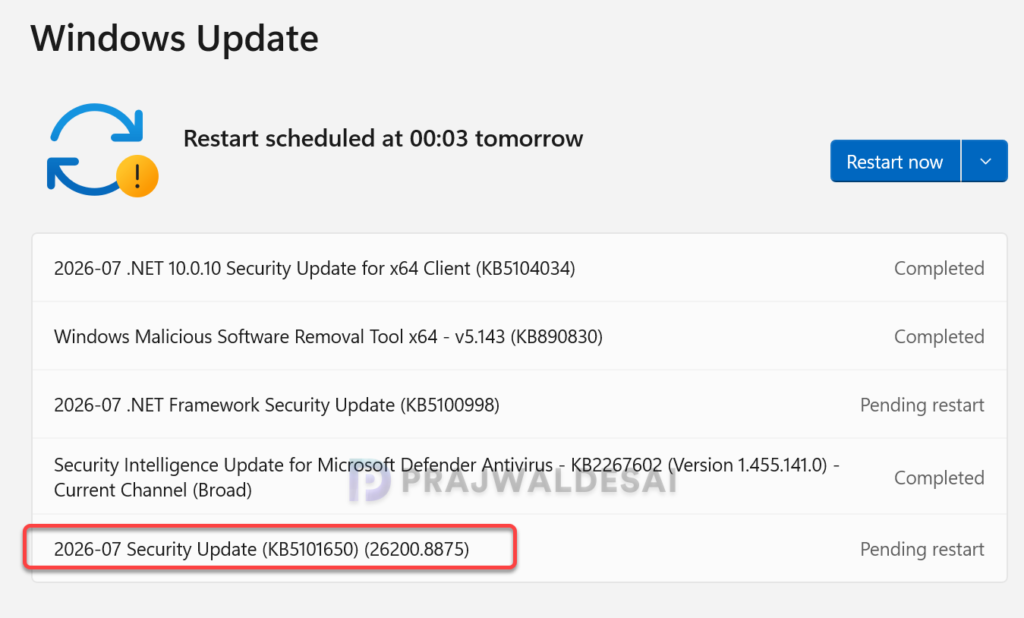
On my Windows 11 PC running version 25H2, I received the following updates via Windows Update.
- 2026-07 .NET 10.0.10 Security Update for x64 Client (KB5104034)
- 2026-07 .NET Framework Security Update (KB5100998)
- 2026-07 Security Update (KB5101650) (26200.8875)
The update requires a system reboot to complete the installation. Simply click the “Restart Now” button to restart your computer. Once your system restarts, your Windows 11 25H2 build will be updated to version 26200.8875, and the Windows 11 24H2 build will be updated to version 26100.8875.
If you’re an organization, you can roll out the above cumulative updates using Configuration Manager (WSUS) or Microsoft Intune depending upon how your devices are managed. I would recommend testing the updates on a pilot device group before you distribute them to all devices.
Known Issues
KB5101650 is a stable update with no known issues reported so far. Should any problems arise, this section will be updated accordingly. Meanwhile, here’s an updated comprehensive guide detailing the updates released for each version of Windows 11, including their respective KB numbers and build numbers.
What’s Next
The July 2026 cumulative updates emphasize stability and minor enhancements, but Microsoft is also experimenting with significant features in the background, such as a movable taskbar and a more refined, simplified search interface. For most users, this update will make Windows feel smoother and faster while using it. These improvements are anticipated in upcoming updates (probably the preview update that will be released at the end of this month). Stay tuned for the future updates!! 📺
