

Microsoft has released KB5129195, an out-of-band (OOB) cumulative update for Windows 11 versions 24H2 and 25H2. Published on September 14, 2026, this update delivers an important security fix along with several critical reliability improvements affecting Remote Desktop Services, Hyper-V Linux VM folder sharing, and USB audio multichannel support.
After installing the KB5124008 update, if your organization or device has been impacted by RDP sign-in failures, RDS instability, or Hyper-V shared folder issues, the KB5129195 OOB update resolves the mentioned issues.
After installing the KB5129195 security update, the devices are updated to the following build numbers:
- Windows 11 24H2: OS Build 26100.9457
- Windows 11 25H2: OS Build 26200.9457
For enterprises, this is a high-priority update due to the combination of security remediation and remote infrastructure fixes. It includes protections for CVE-2026-62721, a Windows User-Mode Power Service elevation of privilege vulnerability. For more information, refer to the KB5129195 (OS Builds 26200.9457 and 26100.9457) documentation.
Key Reliability Fixes
- Remote Desktop Services (RDS) Stability Fix: One of the most significant fixes targets Remote Desktop Services (RDS). Following the September 2026 Windows security update, some organizations experienced unstable RDS environments, including:
- Remote Desktop connection failures.
- Sign-in problems.
- Unresponsive servers during Remote Desktop configuration.
- Management tools such as MMC, RDS Licensing Diagnoser, File Explorer, and Windows Update becoming unresponsive.
- Hyper-V Linux VM Shared Folder Fix: In affected environments, folders shared from Windows hosts to Linux virtual machines via Plan9 either failed to appear or could not be accessed by the guest OS. This update restores expected folder-sharing behaviour.
- USB Audio Multichannel and 3D Audio Fix: The update resolves a problem impacting some USB Audio Class 1.0 devices. While stereo audio continued to function correctly, users could encounter failures when using advanced audio configurations such as: 8-channel audio, 3D audio modes, and other multichannel audio features.
Installing the update
Microsoft states that KB5129195 is available automatically through Windows Update. Organizations that prefer manual deployment can download standalone packages from the Microsoft Update Catalog. The update can also be deployed via Intune or Configuration Manager depending upon the solution you have opted for your organization.
To check for the latest update, enter Windows Update settings (Settings > Windows Update) and select Check for updates. The 2026-09 Security Update (KB5129195) (26200.9457) begins to install now.
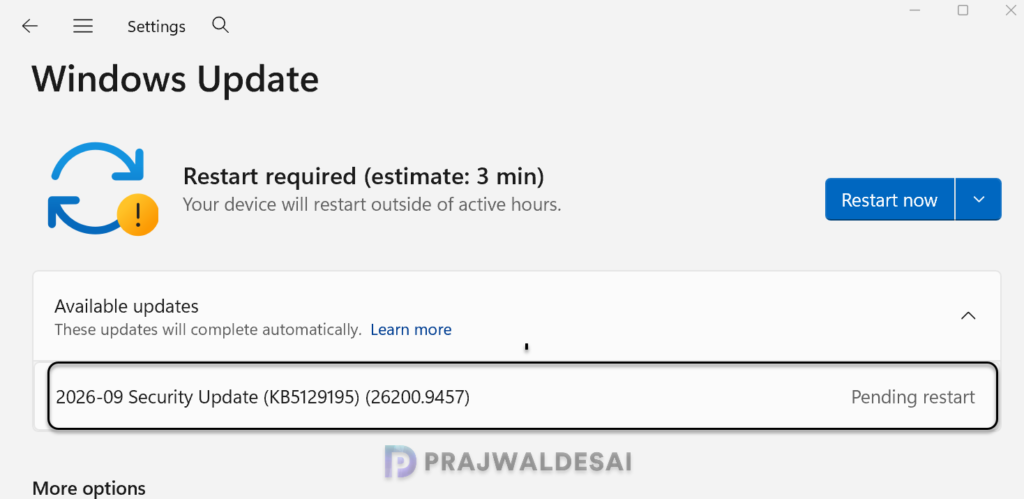
The update requires a system reboot to complete the installation. Simply click the “Restart Now” button to restart your computer.
Known Issues
Although KB5129195 fixes some USB audio issues, Microsoft says not all audio-related problems are resolved in this release. Microsoft continues to investigate issues affecting some USB Audio Class 1.0 devices, where users may encounter Code 10 errors or no audio output in certain scenarios.
If you use affected USB audio hardware, it may be worth monitoring Microsoft’s release notes before making broad deployments. Lastly, here’s a comprehensive guide by me detailing the updates released for each version of Windows 11, including their respective KB numbers and build numbers.
