

The KB5101684 preview cumulative update for Windows 11 versions 24H2 and 25H2 has been released by Microsoft, and it features more than 40 fixes and enhancements. The update enhances Start menu reliability, adds Windows Hello upgrades, adds Voice Isolation to Voice Access, new touchpad gesture controls, MDM fixes, and much more.
This cumulative update released on July 28, 2026, for Windows 11, version 25H2 and 24H2 (KB5101684), includes production-quality improvements. Installing this update is optional, and if you’re comfortable installing preview builds, this one is worth trying. Otherwise, expect these improvements to arrive in the next Patch Tuesday rollout.
What’s new in the KB5101684 Preview Update for Windows 11
Here’s a breakdown of the most notable fixes and improvements included with this update.
- File Explorer: File sizes in the Details view are now displayed using appropriate units (KB, MB, GB) instead of KB-only, making them easier to understand at a glance.
- Widgets: Taskbar notification badges now use your Windows accent color instead of appearing red, helping reduce unnecessary attention-grabbing alerts.
- Windows Hello: Windows Hello Enhanced Sign-in Security (ESS) now supports peripheral fingerprint sensors.
- Touchpad: Includes new touchpad gesture controls that let you adjust scroll and zoom speed, and enable accelerated scrolling for faster navigation through long documents. You can find these options by going to Settings > Bluetooth & devices > Touchpad.
- Voice Access: This update adds Voice Isolation to Voice Access, helping it better recognize your voice by reducing interference from other speakers and background noise.
- Windows Search: The update enhances app search for typos and partial names and improves Settings search by prioritizing relevant results.
- Start menu: The update enhances Start menu reliability by retaining view preferences and improves keyboard navigation for the apps list.
- Voice Typing & Input: This update improves the persistence of mouse cursor size. Fluid dictation is now off by default for new users.
- Account Control: The update redesigns the Start menu account control and adds a badge showing your subscription status, accessible by clicking your account picture in the Start menu’s lower-left corner for Microsoft account users.
- AI Component: You can now uninstall the Image Generation AI from compatible Copilot+ PCs.
- Mobile device management (MDM): This update resolves an issue where Windows devices (versions released on/after July 14, 2026) remain noncompliant after MDM enrollment, affecting access to corporate resources.
- Storage: This update resolves an issue with File History backups to network shares via SMB, where backups failed due to a false “invalid credentials” error.
- Power and Battery: This update enhances power settings reliability by ensuring changes apply to all plans, including display, sleep, and button settings. It also restores setting a threshold for energy saver activation in Settings > System > Power & Battery.
- Windows Update: The update enhances Windows Update progress calculations and optimizes clean-up logic for better system performance post-update.
- Network: This update enhances DHCP renewal reliability, especially for NACKs from the server and on devices using Modern Standby.
- Print and Clipboard: This update improves print time performance (page per minute) for IPPS (Internet Printing Protocol Secure) printers. It also enhances clipboard reliability in Remote Desktop and Azure Virtual Desktop scenarios.
- Date and Time: This update enhances time zone change notifications and improves daylight saving time data accuracy for Beirut, Casablanca, Jerusalem, and Nuuk.
For other fixes, please refer to the July 28, 2026—KB5101684 documentation (OS Builds 26200.8973 and 26100.8973) Preview.
Installing KB5101684 Update on Windows 11
The KB5101684 optional preview update is offered through Windows Update for devices running Windows 11 25H2 and 24H2. To check for the latest update, enter Windows Update settings (Settings > Windows Update) and select Check for updates.
If you don’t see the latest non-security and feature updates, open the “Windows Update” settings, turn on the “Get the latest updates as soon as they’re available” option, and click the “Check for Updates” button. The 2026-07 Preview Update (KB5101684) (26200.8973) begins to install now.
The update requires a system reboot to complete the installation. Simply click the “Restart Now” button to restart your computer. Once your system restarts, your Windows 11 25H2 build will be updated to version 26200.8973, and the Windows 11 24H2 build will be updated to version 26100.8973.
Get the update from the Microsoft Update Catalog
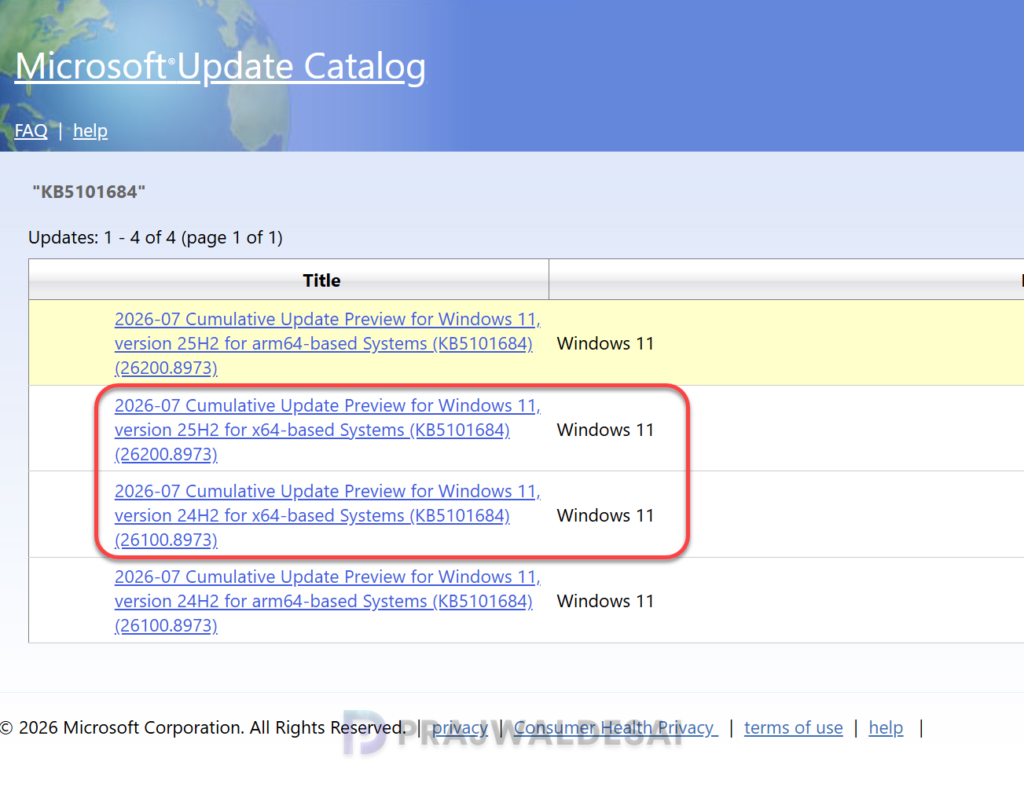
To manually download the KB5101684 cumulative update preview standalone package(s), go to the Microsoft Update Catalog website and get it for your version of Windows 11. This should be done only when the update is not listed under Windows updates.
Updates to AI Components
The KB5101684 updates the following AI components.
| AI Component | Version |
|---|---|
| Image Search | 1.2607.840.0 |
| Content Extraction | 1.2607.840.0 |
| Semantic Analysis | 1.2607.840.0 |
| Settings Model | 1.2607.840.0 |
Uninstalling the Update
If you haven’t installed the Windows 11 preview update KB5101684 yet, you may pause updates in Settings. If you’ve already installed the update and you are encountering some known issues, go to Settings > Windows Update > Update history > Uninstall updates. Alternatively, you may also use PowerShell to list the updates and uninstall them.
Known Issues
No known issues have been reported with this update. However, if you intend to deploy it to Windows 11 devices using SCCM or Intune in your organization, it’s advisable to first install it on a pilot group of devices. After thorough testing, you can proceed to roll it out to a broader group of devices.
Lastly, here’s a comprehensive guide detailing the updates released for each version of Windows 11, including their respective KB numbers and build numbers.
