The System Center Operations Manager upgrade process includes a script designed to clean up ETL tables and groom the database. However, you can manually clean up the ETL table for SCOM database for a faster upgrade using a script provided by Microsoft.
For scenarios involving a substantial number of rows (over 100,000) requiring cleanup, Microsoft advises executing the script before initiating the SCOM upgrade. This approach helps accelerate the upgrade process and minimizes the risk of setup timeouts.
An ETL table in the context of an SQL database refers to a table that is used in the ETL (Extract, Transform, Load) process. ETL tables play a vital role in data management and analytics, enabling organizations to consolidate and analyze data from multiple sources efficiently.
Script to Clean Up the ETL Table
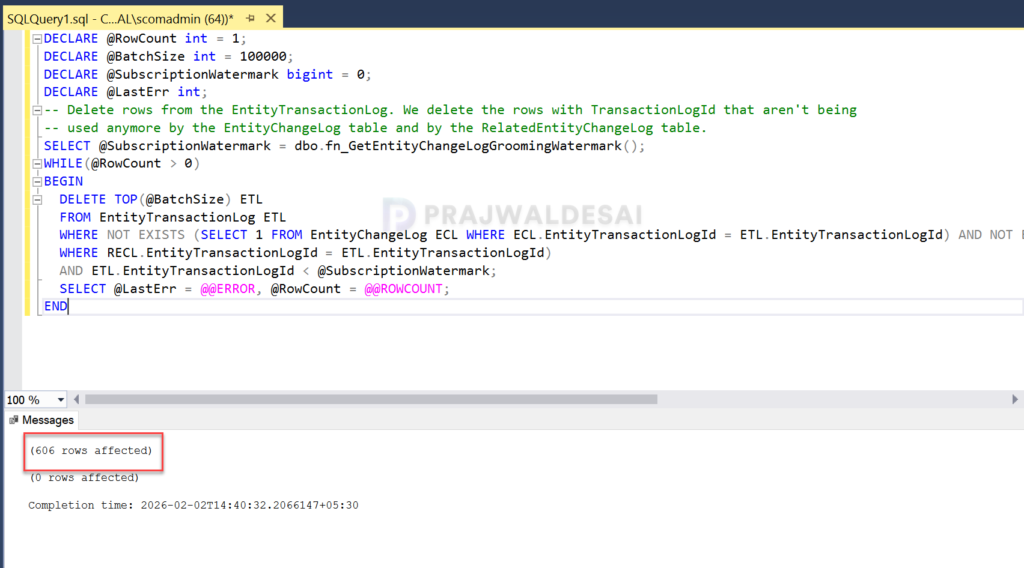
The below script by Microsoft lets you clean up the ETL tables and groom the database. This script will groom the ETL entries in a loop 100K rows at a time to avoid filling up the transaction log. You must run the script on the SQL Server hosting the Operations Manager database with a large amount of ETL rows to groom.
-- (c) Copyright 2004-2006 Microsoft Corporation, All Rights Reserved         --
-- Proprietary and confidential to Microsoft Corporation                      --
-- File:      CatchupETLGrooming.sql                                          --
-- Contents: A bug in the ETL grooming code could have left the user          --
-- Database with a large amount of ETL rows to groom. This script will groom  --
-- The ETL entries in a loop 100K rows at a time to avoid filling up the      --
-- Transaction log                                                            --
--------------------------------------------------------------------------------
DECLARE @RowCount int = 1;
DECLARE @BatchSize int = 100000;
DECLARE @SubscriptionWatermark bigint = 0;
DECLARE @LastErr int;
-- Delete rows from the EntityTransactionLog. We delete the rows with TransactionLogId that aren't being
-- used anymore by the EntityChangeLog table and by the RelatedEntityChangeLog table.
SELECT @SubscriptionWatermark = dbo.fn_GetEntityChangeLogGroomingWatermark();
WHILE(@RowCount > 0)
BEGIN
  DELETE TOP(@BatchSize) ETL
  FROM EntityTransactionLog ETL
  WHERE NOT EXISTS (SELECT 1 FROM EntityChangeLog ECL WHERE ECL.EntityTransactionLogId = ETL.EntityTransactionLogId) AND NOT EXISTS (SELECT 1 FROM RelatedEntityChangeLog RECL
  WHERE RECL.EntityTransactionLogId = ETL.EntityTransactionLogId)
  AND ETL.EntityTransactionLogId < @SubscriptionWatermark;
  SELECT @LastErr = @@ERROR, @RowCount = @@ROWCOUNT;
ENDRunning ETL Grooming Script on SCOM Database
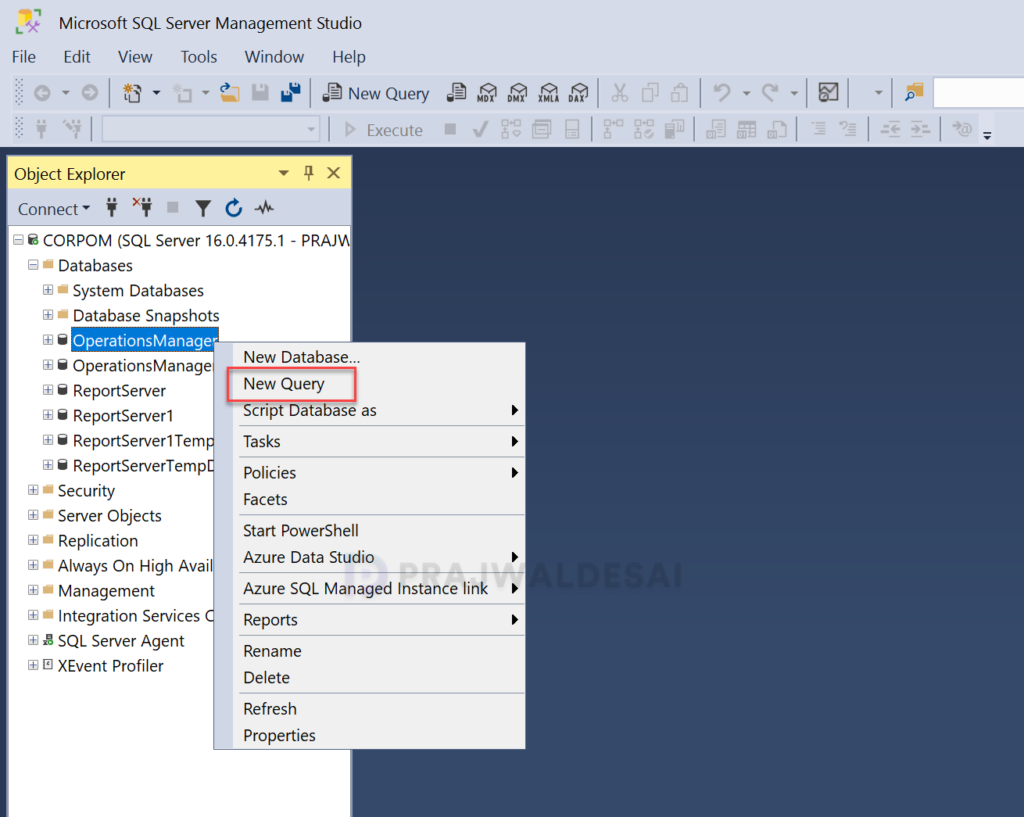
Sign in to SQL Server hosting the Operations Manager database. Launch the SQL Server Management Studio and connect to the database engine. Expand Databases, right-click the OperationsManager database, and select New Query.
Paste the ETL cleanup script and click on Execute. Clean up of ETL can take several hours to complete. Once the script execution is complete, close the SSMS and proceed with the operations manager upgrade.