In this post I will share the how to resolve “Error sending DAV request HTTP code 401 405” that prevents downloading applications from the software center. The solution aims to help Configuration Manager administrators to resolve this particular issue within their environment.
Last week, I dedicated significant time to resolving a critical issue where the customer had lost confidence in Configuration Manager. Most of the common troubleshooting steps were done by existing admins but the users were unable to download applications from the Software Center.
When I was approached regarding this issue, my initial assumption was a misconfiguration of the boundary and boundary group but that wasn’t the case. The client push installs were working fine and the communication between the clients and MP, DP was working fine. The problem was only with application installation via software center.
Clients won’t download applications via the Software Center
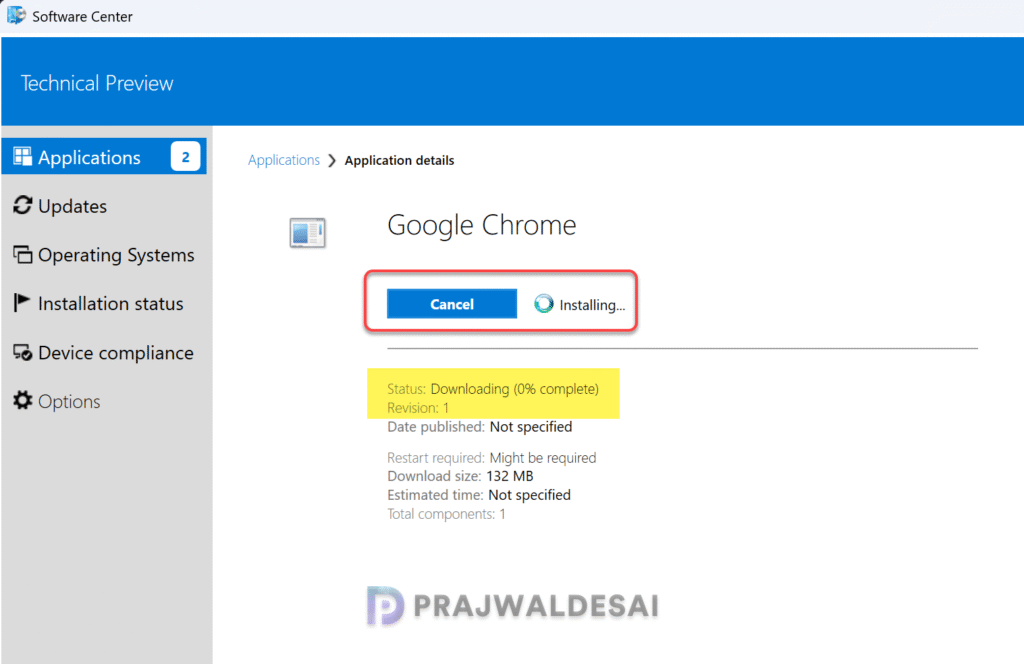
The software center showed no errors, yet the application remained stuck at 0% downloading. The content was distributed to the local distribution point. Although the ccmcache folder contained new sub-folders, they were empty with no downloaded files.
The screenshot below illustrates the described scenario: upon selecting an application in the Software Center and clicking the install button, the download process begins but remains stuck at 0%, failing to progress further.
A detailed review of the logs offered crucial insights, helping me to pinpoint the root cause and devise an effective solution. Let’s explore the details.
Reviewing Essential Logs
Having worked with Configuration Manager for over a decade, I can confidently say that troubleshooting issues is impossible without utilizing the SCCM log files. To resolve the error sending DAV request HTTP 401 405 problem, I analyzed the following logs.
AppDisovery.log
The AppDiscovery log records details about the discovery or detection of applications on client computers. When I reviewed this log on the client computer, I noticed that none of the applications were discovered and it contained the following information in the log.

From the log snippet provided below, we see that the client failed to detect the deployment type for the application.
+++ MSI application not discovered [MSI Product Code: {0AA2C178-BF99-3F72-BA87-F6123A1A95C8}, MSI Product version: ]	AppDiscovery
+++ Did not detect app deployment type Google Chrome - Windows Installer (*.msi file)(ScopeId_E256176B-CDCE-4757-A354-379D994B6397/DeploymentType_3cff406c-9065-4b78-bd39-2d4ba0fe5300, revision 1) for system.SCClient_domain@username_1.log
Next, I reviewed the SCClient_domain@username_1.log which records the user activity for the software center. This log was receiving Event Application Enforcement Progress, state 6, causing a state display value of Downloading (0% complete) error. So, it was not directly a software center problem here, but the application was not downloaded in the first place.

The property SoftwareVersion can't be found. 	 (Microsoft.SoftwareCenter.Client.Data.WmiResultObject at Microsoft.SoftwareCenter.Client.Data.IResultObject.get_Item)Exception caught in Microsoft.SoftwareCenter.Client.Data.IResultObject.Item, line 112, file F:\dbs\el\emra\src\DataAbstractionLib\WmiDataProvider\WmiResultObject.cs - Type System.Collections.Generic.KeyNotFoundException: The given key was not present in the dictionary. 	 (Microsoft.SoftwareCenter.Client.Data.WmiResultObject at Microsoft.SoftwareCenter.Client.Data.IResultObject.get_ItemStackTrace:    at System.Collections.Generic.Dictionary`2.get_Item(TKey key)
at Microsoft.SoftwareCenter.Client.Data.WmiResultObject.Microsoft.SoftwareCenter.Client.Data.IResultObject.get_Item(String name)AppDetails received Event Application Enforcement Progress, state 6, causing a state display value of Downloading (0% complete). The Action Button says _Cancel and its enabled state is True (Microsoft.SoftwareCenter.Client.ViewModels.ApplicationDetailsViewModel+<WmiDataConnection_WmiNotificationEvent>d__141 at MoveNext)DataTransferService.log
Data transfer service log is a crucial log that records all BITS communication for policy or package access. If your application fails to download, this is the log file that you must review.
In this log, I noticed several errors and one of which grabbed my attention. The first one being the application download failed with code 0x80070005. The other error was HTTP Error sending DAV request. HTTP code 401, status ‘Unauthorized‘ and HTTP code 405, status ”.
Next, from the client computer, I accessed the package link via browser (https://SCCMServer/CCMTOKENAUTH_SMS_DP_SMSPKG$/Content_ID), and I could view and download the actual application from the browser. The issue was caused by interruptions in the application downloads, originating from the server side rather than the client side.

Successfully queued event on HTTP/HTTPS failure for server 'SCCM Server'.
GetDirectoryList_HTTP Error sending DAV request. HTTP code 405, status
[CCMHTTP] ERROR: URL=SCCM Server:443/CCMTOKENAUTH_SMS_DP_SMSPKG$/Content_0bbb94f5-873e-4d87-a63b-682be6542552.1?, Port=443, Options=1248, Code=0, Text=CCM_E_BAD_HTTP_STATUS_CODE
[CCMHTTP] ERROR INFO: StatusCode=401 StatusText=Unauthorized
GetDirectoryList_HTTP Error sending DAV request. HTTP code 401, status 'Unauthorized' GetDirectoryList_HTTP('https://SCCM/CCMTOKENAUTH_SMS_DP_SMSPKG$/Content_0bbb94f5-873e-4d87-a63b-682be6542552.1') failed with code 0x80070005.
DTSJob({B01545F0-D29C-405F-A72B-1009AF3C1C07}): state changing from 'DownloadingManifest' to state 'Suspended'.
Resolving Error sending DAV request HTTP code 401 405
If you’re encountering the problem where applications are stuck downloading in the software center along with error sending DAV request HTTP code 401 405, the solution is to uninstall the WebDAV module from IIS on SCCM server and reboot the server.
The older versions of Configuration Manager required WebDAV to be enabled on IIS for clients to download content from SCCM distribution points using HTTP and HTTPS, especially when BITS was also enabled. However, current branch versions of SCCM do not require WebDAV publishing module anymore and can be removed safely.
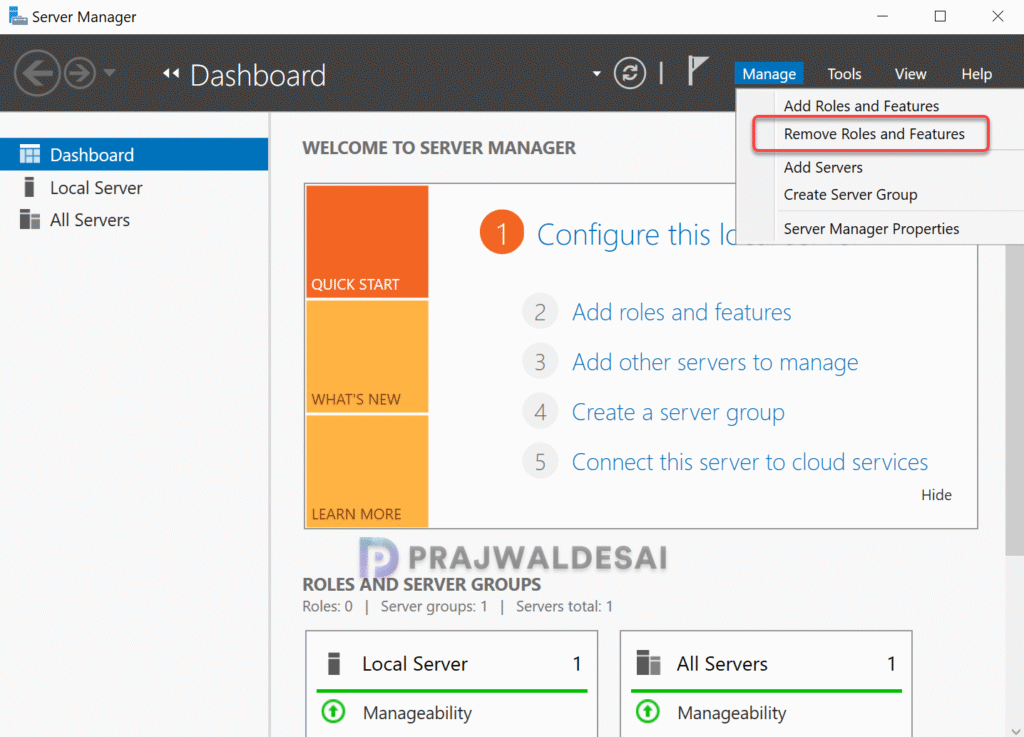
To uninstall the WebDAV publishing module from IIS, sign in to SCCM server. Open the Server Manager and select Manage > Remove Roles and features.
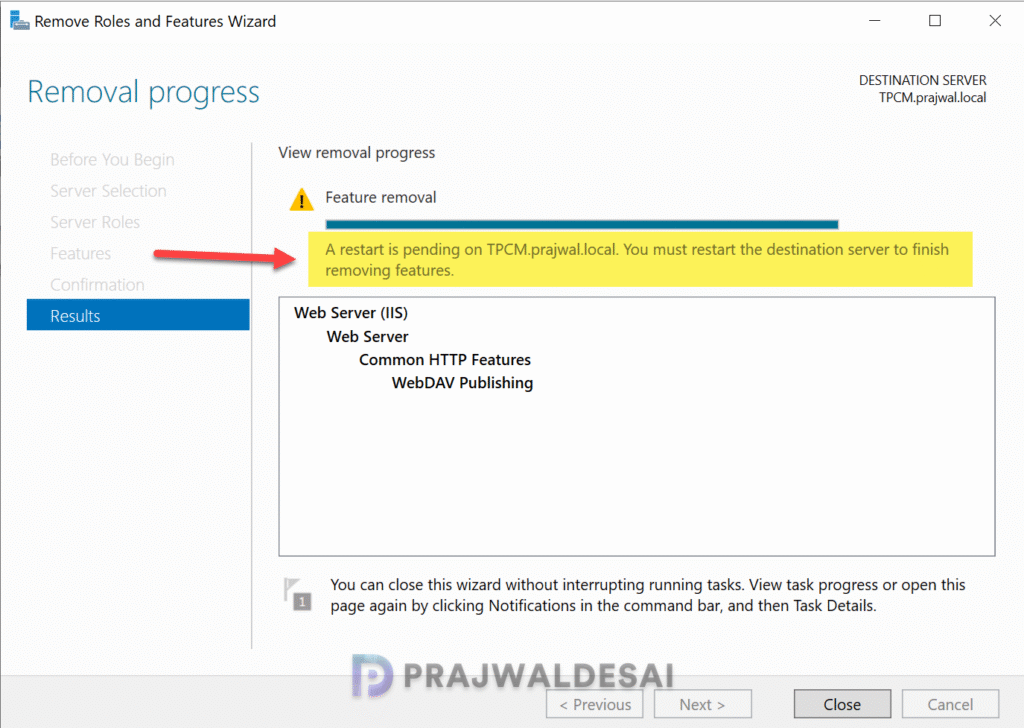
On the Server Roles page, uncheck the WebDAV Publishing module located under Web Server (IIS) role. Click Next.

Select Remove.

Once the WebDAV Publishing feature is uninstalled, restart the server.
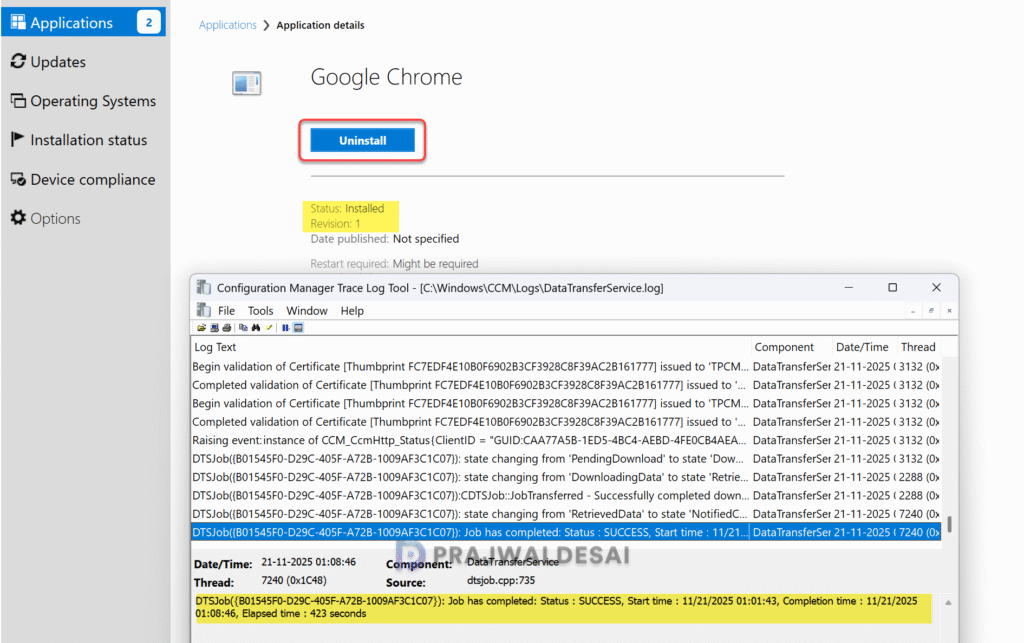
Open the software center on the client computer, select an application, and click Install. The application is downloaded from the distribution point server and installation is complete.