

Microsoft has officially released KB5132057, a non-security preview update for Windows 11 versions 26H2 and 25H2. This optional update contains over 30 key improvements and focuses on performance optimizations, usability enhancements, and new user experiences that are expected to become part of future mandatory cumulative updates.
If you remember, in the last month Microsoft released the KB5127936 preview update for Windows 11 versions 26H2 and 25H2, whose features were then added to the November 2026 Patch Tuesday update.
The November 2026 preview release introduces a redesigned Windows Search experience, improvements to Windows Hello facial recognition, enhanced File Explorer search capabilities, and a collection of fixes aimed at making Windows 11 more responsive and productive.
What’s new in KB5132057 Preview Update
As I mentioned earlier, the KB5132057 preview update brings numerous improvements for users. Below, I have described some useful features that you can experience after installing this update.
1. Redesigned Windows Search Experience
One of the most significant additions in KB5132057 is a completely refreshed Windows Search interface. Microsoft has streamlined the search experience by presenting results in a simpler, easier-to-scan format while also improving performance and memory efficiency. Users can now find files, applications, settings, and other content more quickly with fewer distractions. The updated experience also improves performance and memory efficiency.
2. New Inline Actions in Windows Search
From my observations, Windows Search is becoming more than a tool for finding files. In fact, this year, I have seen numerous improvements made to the search feature after several users have provided feedback. You can now use Windows Search to quickly enable or disable Bluetooth, turn Dark Mode on or off, adjust screen brightness, mute audio, arrange open windows, and much more.
3. File Explorer Search is much faster
Microsoft has also improved File Explorer search functionality. Searching “This PC” now uses an indexer-based approach, making results appear faster and more consistently across the operating system. This change helps users locate documents, media files, and folders more efficiently, especially on systems with large storage drives.
4. Windows Hello Improvements
Windows Hello facial recognition can now temporarily brighten your screen to help you sign in when you’re in a dark or dimly lit room. To turn on this feature, go to Settings > Accounts > Sign-in options > Facial recognition (Windows Hello) and turn on Automatically adjust screen brightness during face recognition.
5. Updated Run Dialog
With the Windows 11 KB5132057 preview update, Microsoft rolled out a refreshed Run dialog interface. The modernised design offers a cleaner look and a faster launch experience. You can try the new experience by going to Settings > System > Advanced and turning on the New Run dialog.
Installing Windows 11 KB5132057 Preview Update
The KB5132057 preview update is offered through Windows Update for devices running Windows 11 26H2 and 25H2. If you don’t see the update listed, open the “Windows Update” settings, turn on the “Get the latest updates as soon as they’re available” option, and click the “Check for Updates” button.
The 2026-11 Preview Update (KB5132057) (26300.10075) update begins to download, and wait for it to complete the installation. I also received the 2026-11 .NET Framework Previews Update (KB5137006) on my PC. The update requires a system reboot to complete the installation. Simply click the “Restart Now” button to restart your computer.
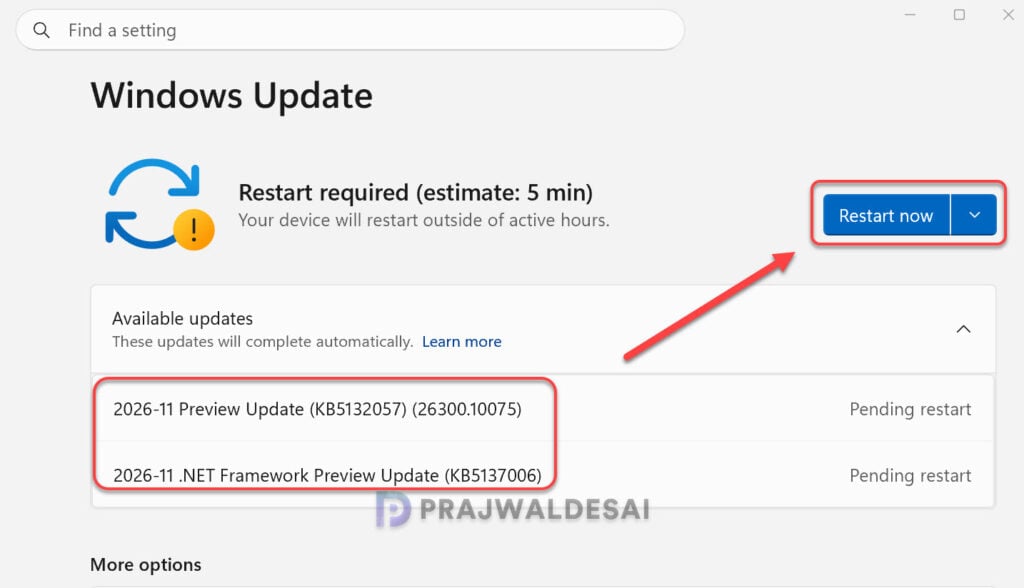
After installing the update, the devices are updated to the following build numbers:
- Windows 11 26H2: OS Build 26300.10075
- Windows 11 25H2: OS Build 26200.10075
You may also download the standalone package(s) for this update from the Microsoft Update Catalog. This update contains MSU files that require installation in a specific order.
Important Announcement from Microsoft
Microsoft has confirmed that there will be no optional non-security preview update released during the second half of December 2026 due to reduced operations during the holiday period. Regular servicing for both security and preview updates is scheduled to resume in January 2027.
Known Issues
While KB5132057 introduces several new features and usability improvements, Microsoft has confirmed a known issue where the SQL Server linked server connections might remain open. After installing Windows updates from October 13, 2026, SQL Server linked server queries using OLE DB providers may leave connections open, affecting server performance over time. This issue impacts connections to external databases like Oracle and PostgreSQL. Administrators may notice growing idle connections, which can be temporarily managed by manually closing them or restarting the SQL service, but these actions might disrupt current operations and the issue may reoccur.
Lastly, here’s a comprehensive guide by me detailing the updates released for each version of Windows 11, including their respective KB numbers and build numbers.
