


If your Skype for business recording shows pending status, this article will show you how to resolve it. You can resolve the same problem with Lync by following the instructions in this article.
Recently, we discovered that users were unable to export the recorded calls during Skype (Lync) meetings, and the recordings were marked as pending and never completed.
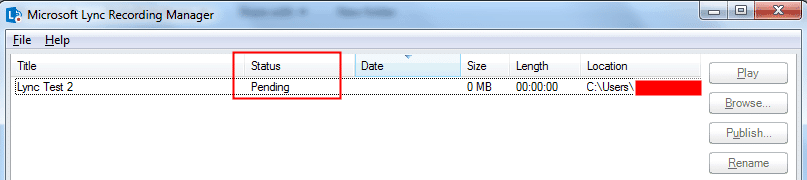
The Skype for Business Recording Manager allows you to play your meeting recordings, browse to the location where you have them saved, or publish them for others to view. The Skype for Business Recording Manager was in a pending state for over an hour and would not create the recorded file to share.
Numerous users experienced this, and no one could figure out why Skype was not recording the meetings. Restarting the computer was also done as a basic troubleshooting step to see if the Skype application was having any problems.
Note that Lync is becoming Skype for Business. Installing KB3115883, which fixes the error “You need to install additional updates” when you launch the Lync 2013 client, is necessary to make sure that does not happen.
Where does Skype save the recordings?
While using Skype for business, you can begin recording your call if the participant’s organization allows it. Your Skype for Business meeting recordings are saved in the Videos > Lync Recordings folder. The recording will be saved as an MP4 file. If you prefer to change the location, click Browse and choose a different folder.
Upon the completion of the Skype meeting, there were no audio or video files populated in the C:\Users\Username\Video\Lync Recordings folder. So either the recording did not happen or the recording wasn’t saved to a file.
It was recommended to wait until the status changed from pending to completed after checking a number of Skype forums; however, in my case, the status remained pending for a considerable amount of time, and the video was never published. The solution to this problem is quite bizarre, and you can see from the comments section that it was successful for an enormous number of people.
Fix Skype for Business Recording Shows Pending Status
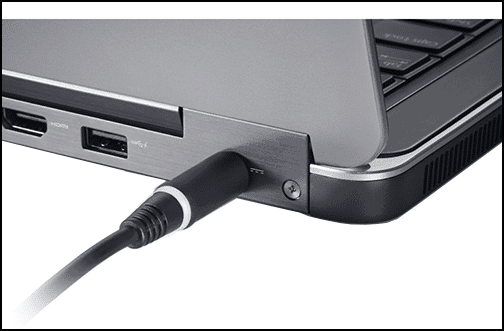
If your meeting recording status is pending, hovering your mouse over it displays the message “Pending was paused to save power; plug in to continue.” The solution here is to connect a power supply directly to the laptop battery port. The recordings are exported when the laptop’s power source is connected.
What is the reason behind the successful export of recorded Skype and Lync meetings once the laptop was powered on? The recorded meetings weren’t exported or published because Skype or Lync export the meetings only when the laptop is connected to a power source. The fact that publishing a video uses a lot of CPU power may also be the cause.
So, the next time you are in a meeting, make sure your laptop is connected to a power source so that you can successfully record and export videos.
Play and share a recording
Once you have successfully recorded the meeting via Skype or Lync, you can access it to play or send to others. Skype for Business displays a message when the recording is ready. You can click the alert to open Recording Manager, or if you miss that, click Tools on the Skype for Business main window, then Recording Manager.
Use the following steps to share a Skype call recording from the Recording Manager window:
- Click your recording to highlight it, then click Play on the right side of the window.
- You can also rename or delete your recording here.
- To share your recording with others, click Browse to locate it, then copy the file to post on a shared location, such as OneDrive or an internal SharePoint site.

Yes, it definitely works !!
Thank you so much for this information i got a relief now as i recorded a critical session and i got panicked but thanks to you again
This word!! Thanks so much 🙂
Thank you so much Prajwal !! It worked ….
Wow. What an informative and simple article you provided. I appreciate it. Before, I tried Acethinker Screen Grabber Pro to record Lync sessions. But I will definitely try the tip you provided. Thank you so much!
Thank you so much for the simple trick to solve the issue …thanks a lot
Lol. Didn’t expect it to be this simple. Thanks a lot Prajwal!
Thanks a lot!! It worked
Thanks a lot!!!!
perfect solution! pending status changed in the moment i connected the AC adaptor.
Thanks for help! Works like a Buick!
thanks a lot for the info!
Thanks for this,..really helpful
Thank you so much..!
Thanks for this really helpful article 🙂
I also remember that it once didn’t work because of some internet network issues that I used to have.
Glad to hear that 🙂
Oh my god..You saved my work…Thanks Man
Glad to hear that 🙂
Thanks for this man!!
I have Status Warning in My Skype Recording Manager, what could be the issue ?
Thanks in Advance
Thank you for sharing your findings!
Thanks for this!!
It really works as crazy as it sounds, Thank you!!!
Thank you Prajwal! I was totally lost on what to do.
Yes plugging AC adopter created file . Thanks for sharing this.
You are right, same thing happened to me as well and using same process I am able to get my recording. Thanks a lot for your blog, it helped me to get of that weird thing.
Worked for me! thanks a lot
Thank you so much. You are awesome!!!
Thank you so much… you saved my life … I wonder how bad it would have been if i had lost the recording.. Cheers !!!!
Thanks. This really helped me. I was worried that I lost the recording. Glad I found this page.
This was Very Useful. Happened to me and I am glad that I foud this link and it worked as it said. I did not believe at first but Yeah it Worked !!!
It worked!! Thanks a lot, i was freaking out with that “pending” status. The moment i plugged in, it started saving the file. Thanks again!
lol..it worked..its so crazy to think so..
Lol..It worked. Thank you so much.
i plugged in and it started to save the recordings lol! thanks a lot!
perfect !!!thank yu
😀 😀 😀 LOL , plugged in the power cord and it started the encoding….. damn, that’s awkward
Thank you, saved me an hour or two!
thanks, this helped.
boss you rocked
thanks it worked
Thank you very much. Worked as expected after connecting to power.
Yes that’s a very simple solution but very important.
I would never think such a thing, thanks!!
Very helpful indeed. Thanks for this.
Brilliant!
Thank you
Eternal thanks for this!
Thank you
Thanks a lot, Helped & worked immediately.
Thank you. Glad to hear that.
This is really helpful, helped solve my issue immediately. Thanks
Thank you!
Thanks prajwaldesai, its a good info, atleast microsoft must include this in the skype recording manager.
That’s correct.
Thanks for this piece. I was going nuts with the recording status at Pending for a really long time. The minute i plugged my charger in, it starting moving. Thanks a ton!
Glad to hear that 🙂
Thanks a lot I almost thought I had lost the recording of one of my most important meetings. Poor from Microsoft though.
Thank you.
Thanks alot!! it worked.
Glad to hear that 🙂
thanks for this great tip and it saved my day 🙂 appreciate your help.
That’s Awesome
Great Tip, I was worried for a minute before finding this
Thank you Gil
I got same issue even battery is full charged. But I am able to publish file by closing the cheating box
Oh Thank you for letting me know! Once I plugged in my computer – the video is publishing like a dream.
Glad to hear that 🙂
You make the world a better place to live! Thanks Hero!
Thanks Raul 🙂
Hero!
Thank you Sandrine 🙂
You just literally saved my life!
Thanks for this article, I’ve been sitting and waiting for recording to change status for loooong time 😀
Glad to hear that this article helped 🙂
I delivered an important session in skype big event. There were 390+ participants. We had a very good interactive session. And as summary mail i was about to give link to download recording of the session when I encountered the same issue; Status as “Pending”.
I got this fix on a very first link on Google It worked immediately. Thanks a lot!!
It was great catch..
Thank you Ashwinee
Hi Prajwal, the recording status bar is not showing any status and it is a blank. Please advise me on the fix
Have you deleted that recording ?.
Good catch!
Looks like I’m not the only one!
thanks Salah 🙂
Exactly what I wanted. This is the top result in Google for a reason.
Glad to hear that 🙂
brilliant /s
it works, thanks
Thanks Standa
very helpful!
Thank you Anton
Thank you! I can’t say that enough! I save the file and you save me!
Thank you.
Oh man, you just SAVED MY ASS or at least reputation. I thought I lost my 1,5 hour meeting record where I promised to distribute it to all participants (93!!!). Whew, once again THANK YOU!!!
That’s great.
yes.. thank you.. 🙂
Thank You! You saved me a minor heart attack 🙂
Yeah.. thank you
1000 Likes…what a solution.
Thank you Suman
Something similar , google sent me directly to your page 🙂 , Cheers for good work.
Thank you
Thanks a ton , Prajwal. It worked .I faced this weird issue. As soon as the AC adapter was connected, the publishing of video started immediately. Was just not able to figure out.
Cool
Thanks for solution it’s worked for me 🙂
Thanks Vijaya 🙂
Prajwal ur awesome !!
Thanks Aditya 🙂
Thank you Prajwal.. Its actually crazy.. But was really helpful..
Thank you. Glad to hear that it helped.
Its insane that you dont get any further info about this directly in skype. Thanks for posting this. Like many other i too got a real sacare but it was resolved after plugging in the charger.
Thank you for the feedback.
Unbelievable! it actually works!
Thank you. Glad to hear that it helped.
Pending was paused to save power, plug in to continue … good eye..:)
Thank you. Glad to hear that it helped.
Thank you – worked for me too!
Thank you for the feedback.
Thanks Prajwal!
Thank you. Glad to hear that it helped.
Vow , crazy but works. Thanks a ton
Thanks Ramesh.
Vow , crazy but works
Thanks Ramesh
Worked for me. Thank you!
Thank you.
Thank you Prajwal, would have been difficult figuring this on out on my own
Thank you. Glad to hear that it helped.
It was really helpful. Thanks!
Thank you.
You diserve the nobel price, my friend, thank you
haha..Thank you. Glad to hear that it helped.
THANK YOU SOOO MUCH!!! THAT SAVED MY PROJECT TODAY!!!!
Thank you. Glad to hear that it helped.
Most useful solution ever read/ heard. Thanks a lot.
Thank you. Glad to hear that it helped.
You are a legend. Thanks for the resolution.
Thank you. Glad to hear that it helped.
Like you said solution given for this one is Crazy, but it’s true man… Cheers..
Yeah it’s crazy.
awesome.. frightened that i might have lost the important recording
Thank you. Glad to hear that it helped.
Wow u just saved our day. What a helpful reply.
Thank you. Glad to hear that it helped.
Thanks so much. It helped me , otherwise I had no clue.
Thank you. Glad to hear that it helped.
Thanks man, you da best! You saved my skin! If I may, in your description of yourself, you have a small typo: ” and I have been working in the IT for over 8 years” I think that “the” between “in” and “IT” is redundant. y
Thanks Polly. I have modified the description 🙂
This is a life saver, thanks!
Thank you Rekha.
THANKS! Even when my computer was almost full charged, as soon as I plugged in the power cord the status changed and the process was finished! It’s something that never cross my mind during troubleshooting. Thanks for the tip!
Thank you. Glad to hear that it helped.
Very helpful, thanks, I thought I wasn’t gonna be able to get my recording back, you saved my life!!
Thank you. Glad to hear that it helped.
Thanks for this! The same thing happened to one of my recordings!
Yeah and sometimes it’s so difficult to figure out this.
Very helpful ..Thanks
Thank you Deepak