


This post lists all the SCOM versions and build numbers along with release dates released by Microsoft so far. Knowing the build numbers will help you determine the version of Operations Manager that you are currently using.
Every SCOM installation has a version and a build number with it. The build number is incremented when you upgrade the SCOM instance. In addition, the build numbers are also applicable for management servers, agents and SCX agents.
SCOM Versions and Build Numbers
This table lists all the SCOM versions along with the build numbers, KB numbers, and release dates.
| SCOM Release | SCOM Build Number | KB (if any) | SCOM Release Date |
| SCOM 2025 | 10.25.10132.0 | November 2024 | |
| SCOM 2022 | 10.22.10118.0 | April 2022 | |
| SCOM 2019 Update Rollup 3 – Hotfix for Web Console | 10.19.10550.0 | 2021-10-12 | |
| SCOM 2019 Update Rollup 3 | 10.19.10505.0 | 2021-03-30 | |
| SCOM 2019 Update Rollup 2 | 10.19.10407.0 | KB4558752 | 2020-08-05 |
| SCOM 2019 Update Rollup 1 | 10.19.10311.0 | KB4533415 | 2020-02-04 |
| SCOM 2019 | 10.19.10050.0 | 2019-03-14 | |
| SCOM 1807 | 7.3.13261.0 | KB4133779 | 2018-06-24 |
| SCOM 1801 | 7.3.13142.0 | Link | 2018-02-08 |
How to Check SCOM Version
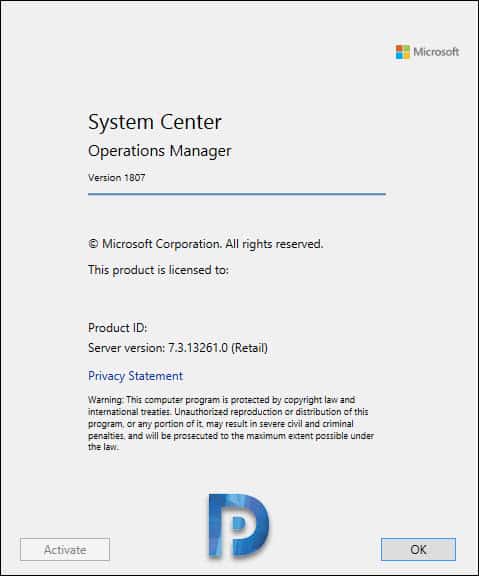
- Launch the Operations Manager Console.
- On the top menu, click Help > About.
- Here you can see SCOM version and server version details.
Find Installed SCOM Version
To find the installed SCOM version, follow these steps:
- Log in to Windows Server installed with Operations Manager.
- Go to Control Panel\Programs\Programs and Features.
- From the list, look for Microsoft System Center Operations Manager and the Version column shows the installed SCOM version.


hi, this has to be updated with new scom release